Showing posts with label synth. Show all posts

Tuesday, June 4, 2013

How to make a track in Tabletop, part 5

This post is part of a series on Tabletop for iOS.  Part one is here:


Adding effects to your instruments in Tabletop is easy.  Like adding an instrument or any other device, click the keyboard icon in the upper right corner.  From the device menu, select an effect device.  Drag it to the tabletop. 


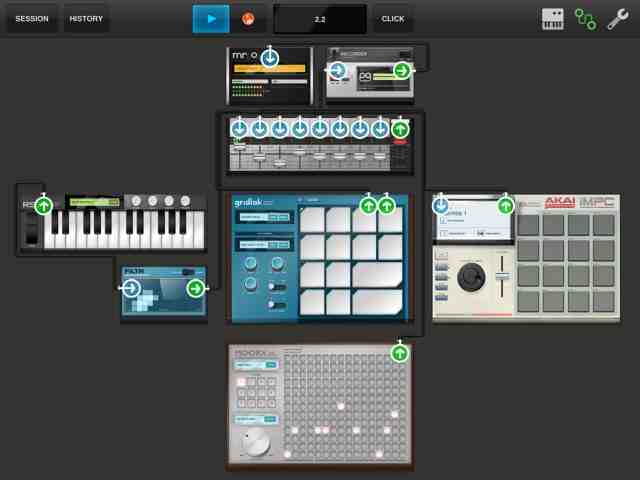
 Now tap the wiring icon in the top right (it is next to the keyboard icon and looks like two circles with a squiggly line connecting them).  This will highlight all the inputs and outputs of the devices on the tabletop. 


Select the output arrow (pointing up) for the instrument device you want the effect applied to.  Drag the output arrow of the instrument to the input arrow (pointing down) of the effect.  In this example I have chosen the 'Filtr' effect to be applied to the 'RS3' synth.


 In the picture above, you can see the animation of a cable being dragged to connect the two devices.


Now the output of the 'RS3' is connected to the input of the 'Filtr', and the output of 'Filtr' is connected to one of the inputs on the mixer.  Play the 'RS3' and drag your finger across the display of the 'Filtr' effect.  You should hear your sound changing.  Cool.

In the next post, I will cover recording external instruments and vocals.  Then we will get to mix downs and more complex beats, songs and arrangements, how to perform or improvise live, and maybe the T-Pain effect.

This post is part of a series on Tabletop for iOS.  Part one is here:
http://makemusicfreedom.blogspot.com/2013/06/how-to-make-track-in-tabletop.html

Sunday, June 2, 2013

How to make a track in Tabletop, part 3


Continued from part 2

I listen to the two tracks together, bringing the volume back up on the 'Gridlok' track.  I tap the keyboard icon in the top right to open the device menu.  I select the 'RS3', a keyboard synth/sequencer, another free device included with Tabletop.  I choose a new patch from the load menu (in the window in the middle of the keyboard) hit record and overdub a simple synth part.


I zoom out and tap the mixer, turn down the other tracks, and solo the 'RS3'.  I zoom out again and tap the session button and select share to soundcloud.


How to make a track in Tabletop, part 1


Tabletop is more than just a beat making or recording app, in a lot of ways, it is an environment.  Imagine having a big card table and loads of equipment and unlimited cabling.  Samplers, keyboards, drum machines, sequencers, effects, recorders, splitters, mergers, and more.  There is also an in app store for add-ons, more instruments, effects, and utilities from and third parties.  (I got the Akai iMPC.  I heard good reviews and the features looked great.  I really like it.  I will cover it in a future post.  $6.99 well spent.)

Getting started making a song in Tabletop is easy.  When you start the app you can choose a genre based template or a blank table.  


The blank template comes equipped with the audio out device, called 'mr o', and the mixer device plugged into it.


The empty space on the virtual table, around the mixer is there for you to drag and drop devices from the menu opened when you tap on the keyboard icon at the top right of the screen.  

This menu pops up:

At the top of the list of choices is 'my device/device store'.   I will start this track with some of the built in devices, then add a third party Tabletop Ready device that can be purchased from the device store or app store.  

The first instrument I will drag onto the tabletop is the Gridlok sampler.

Tap on the Gridlok device to zoom in and operate.


Load a group of sounds for the pads by pressing the load button in the box right under the "gridlok" logo.


I chose the 'Eastern Swag' kit.  You can change individual patches in the kit, save your own kits, and load your own samples.

Next I clicked the 'wrench' icon in the top right of the screen to see the session settings.


It defaults to 120 BPM when you start, so I tapped in a new tempo.


Now I was ready to record a basic looping drum beat.  Tabletop defaults to a two-bar loop.  You can sequence longer and more complex tunes, perform on the instruments, mixers, and effects live, and record audio of it all, but I will start this track with the default two bars and load one sample player running into a mixer running into an output device that sends sound to your speakers or headphones.  

I tap the click button at the top for a count in and metronome, tap out a simple beat on the iPad touchscreen, and hit stop.  I tap the zoom out button in the top left of the display.  After zooming, I tap the session button at the top left and choose 'share on soundcloud'.  I name the track, Tabletop_ex1_gridlok <<<---link 
and upload it to my soundcloud site www.soundcloud.com/zen_oasis

Friday, May 24, 2013

Get some recording software


If you just want to go ahead and get started, search for a free d.a.w. for your os.
D.A.W. stands for digital audio workstation, a kind of program that acts as a virtual music studio, able to record instruments and voices, blend them together, add creative effects, and much more.  A couple of good d.a.w. programs for different operating systems:
freeware

Audacity for Mac and Windows


Audiostar for iOS


Free unlimited trial


Reaper for Mac and Windows

I know a lot of people that started with Audacity and some of them still use it all the time. Reaper has a ton of features and is a very widely used, even in the professional world.  If you own a Mac made in the last ten years you probably have Garage Band already installed (most iPad owners do, too).  I will cover these audio production applications and many more in future posts.


A good place to start

If you already have a computer, tablet, or smartphone, 440software is a great place to look for free music production applications and plug-ins.  You can search by type of device and operating system (computer or phone, winows or mac os), type of software (recording, musical instrument, effects), and whether the software costs money or is free.